


Bulk Read/Write Tutorial
NOTE: This tutorial is based on XL-430-W250 DYNAMIXEL motors and uses Protocol 2.0.
This section provides examples of how to write code in python to bulk_read and bulk_write data to DYNAMIXEL motors.
Bulk Read/Write enables simultaneous control of multiple motors.
Unlike Sync Read/Write, which can only access the same address across multiple motors, Bulk Read/Write can access different addresses on multiple motors in a single instruction.
In this example, we need two motors to operate simultaneously.
Make python file
- Create a python file and open it in a text editor. In this case, we use visual studio code, but you can use any text editor you prefer.
$ mkdir -p my_dxl_project/python
$ cd my_dxl_project/python
$ code my_bulk_read_write.py
Make python file
-
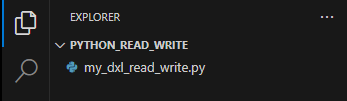
Open the Visual Studio Code and create a python file in your workspace.
Source Code Description
Add Header Files
- Add
#!/usr/bin/env python3and importdynamixel_sdkto the top of your py file. This includes all necessary functions and classes from the DYNAMIXEL SDK.#!/usr/bin/env python3 from dynamixel_sdk import *
Initialize Handler Objects
- Initialize the
PortHandler,PacketHandler,GroupBulkWriteandGroupBulkRead. Set theport nameandprotocol versionaccording to your DYNAMIXEL setup. The example below uses/dev/ttyUSB0as the port name and2.0as the protocol version.portHandler = PortHandler('/dev/ttyUSB0') packetHandler = PacketHandler(2.0) goal_position_address = 116 present_position_address = 132 groupBulkWrite = GroupBulkWrite(portHandler, packetHandler) groupBulkRead = GroupBulkRead(portHandler, packetHandler)
- Initialize the
PortHandler,PacketHandler,GroupBulkWriteandGroupBulkRead. Set theport nameandprotocol versionaccording to your DYNAMIXEL setup. The example below usesCOM3as the port name and2.0as the protocol version.portHandler = PortHandler('COM3') packetHandler = PacketHandler(2.0) goal_position_address = 116 present_position_address = 132 groupBulkWrite = GroupBulkWrite(portHandler, packetHandler) groupBulkRead = GroupBulkRead(portHandler, packetHandler)
Open Port and Set Baud Rate
- Open the port and set the baud rate. The example below uses
57600as the baud rate.portHandler.openPort() portHandler.setBaudRate(57600)
 ERROR LOGGING
ERROR LOGGINGopenPort() and setBaudRate() functions return a boolean value indicating success or failure. If you want to check for failure, you can write like below to print an error message and exit the program.
if portHandler.openPort():
print("Succeeded to open the port!")
else:
print("Failed to open the port!")
exit()
if portHandler.setBaudRate(57600):
print("Succeeded to change the baudrate!")
else:
print("Failed to change the baudrate!")
exit()
Write data to enable torque
- Turn on the torque of the DYNAMIXEL.
dxl_id1 = 1 dxl_id2 = 2 torque_on_address = 64 data = 1 packetHandler.write1ByteTxRx(portHandler, dxl_id1, torque_on_address, data) packetHandler.write1ByteTxRx(portHandler, dxl_id2, torque_on_address, data)id: Dynamixel ID you setaddress: The address of the data you want to write. Refer to the Control Table of your DYNAMIXEL model, which can be found in its specification manual or Dynamixel Wizard 2.0. In this example, we use X series.data: The data you want to write to the specified address.
ERROR LOGGING
ERROR LOGGINGwrite1ByteTxRx() returns a communication result. If you want to check the communication result and error, you can write the code as shown below.
dxl_comm_result, dxl_error = packetHandler.write1ByteTxRx(portHandler, dxl_id1, torque_on_address, data)
if dxl_comm_result != COMM_SUCCESS:
print("%s" % packetHandler.getTxRxResult(dxl_comm_result))
elif dxl_error != 0:
print("%s" % packetHandler.getRxPacketError(dxl_error))
else:
print("Dynamixel#1 has been successfully connected")
dxl_comm_result, dxl_error = packetHandler.write1ByteTxRx(portHandler, dxl_id2, torque_on_address, data)
if dxl_comm_result != COMM_SUCCESS:
print("%s" % packetHandler.getTxRxResult(dxl_comm_result))
elif dxl_error != 0:
print("%s" % packetHandler.getRxPacketError(dxl_error))
else:
print("Dynamixel#2 has been successfully connected")
Add parameters to GroupBulkRead
- Add the DYNAMIXEL IDs to the
GroupBulkRead.present_position_address = 132 data_length_4byte = 4 groupBulkRead.addParam(dxl_id1, present_position_address, data_length_4byte) led_address = 65 data_length_1byte = 1 groupBulkRead.addParam(dxl_id2, led_address, data_length_1byte)
ERROR LOGGING
ERROR LOGGINGaddParam() returns a communication result as boolean. If you want to check the communication result and error, you can write the code as shown below.
dxl_addparam_result = groupBulkRead.addParam(dxl_id1, present_position_address, data_length_4byte)
if dxl_addparam_result != True:
print("[ID:%03d] groupBulkRead addparam failed" % dxl_id1)
exit()
dxl_addparam_result = groupBulkRead.addParam(dxl_id2, led_address, data_length_1byte)
if dxl_addparam_result != True:
print("[ID:%03d] groupBulkRead addparam failed" % dxl_id2)
exit()
Get User Input and Set Data
- Get user input for the target position.
dxl2_led_value_read = 0 while True: try: target_position = int(input("Enter target position (0 ~ 4095, -1 to exit): ")) except ValueError: print("Please enter an integer.") continue if target_position == -1: break elif target_position < 0 or target_position > 4095: print("Position must be between 0 and 4095.") continue - Since
addParam()requires auint8_t *as its input, the data must be provided as a byte array.param_goal_position = [ DXL_LOBYTE(DXL_LOWORD(target_position)), DXL_HIBYTE(DXL_LOWORD(target_position)), DXL_LOBYTE(DXL_HIWORD(target_position)), DXL_HIBYTE(DXL_HIWORD(target_position)) ] if (dxl2_led_value_read == 0): led_data = [1] else: led_data = [0]
Add parameters to GroupBulkWrite
- Add parameter to the
GroupBulkWriteand tranfer the data to the DYNAMIXEL. Also set the LED data to toggle the LED on the second DYNAMIXEL.groupBulkWrite.addParam(dxl_id1, goal_position_address, data_length_4byte, param_goal_position) groupBulkWrite.addParam(dxl_id2, led_address, data_length_1byte, led_data) groupBulkWrite.txPacket() groupBulkWrite.clearParam()
ERROR LOGGING
ERROR LOGGINGtxPacket() and addParam() returns a communication result. If you want to check the communication result and error, you can write the code as shown below.
dxl_addparam_result = groupBulkWrite.addParam(dxl_id1, goal_position_address, data_length_4byte, param_goal_position)
if not dxl_addparam_result:
print("[ID:%03d] groupBulkWrite addparam failed" % dxl_id1)
exit()
dxl_addparam_result = groupBulkWrite.addParam(dxl_id2, led_address, data_length_1byte, led_data)
if not dxl_addparam_result:
print("[ID:%03d] groupBulkWrite addparam failed" % dxl_id2)
exit()
dxl_comm_result = groupBulkWrite.txPacket()
if dxl_comm_result != COMM_SUCCESS:
print("%s" % packetHandler.getTxRxResult(dxl_comm_result))
Read data to get current position
- Read the current position from the DYNAMIXEL until it reaches the target position.
while True: groupBulkRead.txRxPacket() dxl1_present_position = groupBulkRead.getData(dxl_id1, present_position_address, data_length_4byte) dxl2_led_value_read = groupBulkRead.getData(dxl_id2, led_address, data_length_1byte) print("[ID:%03d] Present Position : %d \t [ID:%03d] LED Value: %d" % (dxl_id1, dxl1_present_position, dxl_id2, dxl2_led_value_read)) if abs(target_position - dxl1_present_position) <= 10: break portHandler.closePort()
ERROR LOGGING
ERROR LOGGINGtxRxPacket() and isAvailable() returns a communication result . If you want to check the communication result and error, you can write the code as shown below.
dxl_comm_result = groupBulkRead.txRxPacket()
if dxl_comm_result != COMM_SUCCESS:
print("%s" % packetHandler.getTxRxResult(dxl_comm_result))
You can also check if the data is available in the GroupBulkRead by using the isAvailable() function. If the data is not available, you can print an error message and exit the program.
dxl_getdata_result = groupBulkRead.isAvailable(dxl_id1, present_position_address, data_length_4byte)
if dxl_getdata_result != True:
print("[ID:%03d] groupBulkRead getdata failed" % dxl_id1)
quit()
dxl_getdata_result = groupBulkRead.isAvailable(dxl_id2, led_address, data_length_1byte)
if dxl_getdata_result != True:
print("[ID:%03d] groupBulkRead getdata failed" % dxl_id2)
quit()
Run the Code
- Run the code using python3.
$ python3 my_bulk_read_write.py
-
Run the code through Visual Studio Code.

Full Source Code
#!/usr/bin/env python3

from dynamixel_sdk import *
portHandler = PortHandler('/dev/ttyUSB0')
packetHandler = PacketHandler(2.0)

goal_position_address = 116
present_position_address = 132
groupBulkWrite = GroupBulkWrite(portHandler, packetHandler)
groupBulkRead = GroupBulkRead(portHandler, packetHandler)
if portHandler.openPort():
print("Succeeded to open the port!")
else:
print("Failed to open the port!")
exit()
if portHandler.setBaudRate(57600):
print("Succeeded to change the baudrate!")
else:
print("Failed to change the baudrate!")
exit()
dxl_id1 = 1
dxl_id2 = 2
torque_on_address = 64
data = 1
dxl_comm_result, dxl_error = packetHandler.write1ByteTxRx(portHandler, dxl_id1, torque_on_address, data)
if dxl_comm_result != COMM_SUCCESS:
print("%s" % packetHandler.getTxRxResult(dxl_comm_result))
elif dxl_error != 0:
print("%s" % packetHandler.getRxPacketError(dxl_error))
else:
print("Dynamixel#1 has been successfully connected")
dxl_comm_result, dxl_error = packetHandler.write1ByteTxRx(portHandler, dxl_id2, torque_on_address, data)
if dxl_comm_result != COMM_SUCCESS:
print("%s" % packetHandler.getTxRxResult(dxl_comm_result))
elif dxl_error != 0:
print("%s" % packetHandler.getRxPacketError(dxl_error))
else:
print("Dynamixel#2 has been successfully connected")
present_position_address = 132
data_length_4byte = 4
dxl_addparam_result = groupBulkRead.addParam(dxl_id1, present_position_address, data_length_4byte)
if dxl_addparam_result != True:
print("[ID:%03d] groupBulkRead addparam failed" % dxl_id1)
exit()
led_address = 65
data_length_1byte = 1
dxl_addparam_result = groupBulkRead.addParam(dxl_id2, led_address, data_length_1byte)
if dxl_addparam_result != True:
print("[ID:%03d] groupBulkRead addparam failed" % dxl_id2)
exit()
dxl2_led_value_read = 0
while True:
try:
target_position = int(input("Enter target position (0 ~ 4095, -1 to exit): "))
except ValueError:
print("Please enter an integer.")
continue
if target_position == -1:
break
elif target_position < 0 or target_position > 4095:
print("Position must be between 0 and 4095.")
continue
param_goal_position = [
DXL_LOBYTE(DXL_LOWORD(target_position)),
DXL_HIBYTE(DXL_LOWORD(target_position)),
DXL_LOBYTE(DXL_HIWORD(target_position)),
DXL_HIBYTE(DXL_HIWORD(target_position))
]
if (dxl2_led_value_read == 0):
led_data = [1]
else:
led_data = [0]
dxl_addparam_result = groupBulkWrite.addParam(dxl_id1, goal_position_address, data_length_4byte, param_goal_position)
if not dxl_addparam_result:
print("[ID:%03d] groupBulkWrite addparam failed" % dxl_id1)
exit()
dxl_addparam_result = groupBulkWrite.addParam(dxl_id2, led_address, data_length_1byte, led_data)
if not dxl_addparam_result:
print("[ID:%03d] groupBulkWrite addparam failed" % dxl_id2)
exit()
dxl_comm_result = groupBulkWrite.txPacket()
if dxl_comm_result != COMM_SUCCESS:
print("%s" % packetHandler.getTxRxResult(dxl_comm_result))
groupBulkWrite.clearParam()
while True:
dxl_comm_result = groupBulkRead.txRxPacket()
if dxl_comm_result != COMM_SUCCESS:
print("%s" % packetHandler.getTxRxResult(dxl_comm_result))
dxl_getdata_result = groupBulkRead.isAvailable(dxl_id1, present_position_address, data_length_4byte)
if dxl_getdata_result != True:
print("[ID:%03d] groupBulkRead getdata failed" % dxl_id1)
quit()
dxl_getdata_result = groupBulkRead.isAvailable(dxl_id2, led_address, data_length_1byte)
if dxl_getdata_result != True:
print("[ID:%03d] groupBulkRead getdata failed" % dxl_id2)
quit()
dxl1_present_position = groupBulkRead.getData(dxl_id1, present_position_address, data_length_4byte)
dxl2_led_value_read = groupBulkRead.getData(dxl_id2, led_address, data_length_1byte)
print("[ID:%03d] Present Position : %d \t [ID:%03d] LED Value: %d" % (dxl_id1, dxl1_present_position, dxl_id2, dxl2_led_value_read))
if abs(target_position - dxl1_present_position) <= 10:
break
portHandler.closePort()
#!/usr/bin/env python3
from dynamixel_sdk import *
portHandler = PortHandler('COM3')
packetHandler = PacketHandler(2.0)

goal_position_address = 116
present_position_address = 132
groupBulkWrite = GroupBulkWrite(portHandler, packetHandler)
groupBulkRead = GroupBulkRead(portHandler, packetHandler)
if portHandler.openPort():
  print("Succeeded to open the port!")
else:
  print("Failed to open the port!")
  exit()

if portHandler.setBaudRate(57600):
  print("Succeeded to change the baudrate!")
else:
  print("Failed to change the baudrate!")
  exit()
dxl_id1 = 1
dxl_id2 = 2
torque_on_address = 64
data = 1
dxl_comm_result, dxl_error = packetHandler.write1ByteTxRx(portHandler, dxl_id1, torque_on_address, data)
if dxl_comm_result != COMM_SUCCESS:
    print("%s" % packetHandler.getTxRxResult(dxl_comm_result))
elif dxl_error != 0:
    print("%s" % packetHandler.getRxPacketError(dxl_error))
else:
    print("Dynamixel#1 has been successfully connected")

dxl_comm_result, dxl_error = packetHandler.write1ByteTxRx(portHandler, dxl_id2, torque_on_address, data)
if dxl_comm_result != COMM_SUCCESS:
    print("%s" % packetHandler.getTxRxResult(dxl_comm_result))
elif dxl_error != 0:
    print("%s" % packetHandler.getRxPacketError(dxl_error))
else:
    print("Dynamixel#2 has been successfully connected")
present_position_address = 132
data_length_4byte = 4
dxl_addparam_result = groupBulkRead.addParam(dxl_id1, present_position_address, data_length_4byte)
if dxl_addparam_result != True:
print("[ID:%03d] groupBulkRead addparam failed" % dxl_id1)
exit()
led_address = 65
data_length_1byte = 1
dxl_addparam_result = groupBulkRead.addParam(dxl_id2, led_address, data_length_1byte)
if dxl_addparam_result != True:
print("[ID:%03d] groupBulkRead addparam failed" % dxl_id2)
exit()
dxl2_led_value_read = 0
while True:
    try:
        target_position = int(input("Enter target position (0 ~ 4095, -1 to exit): "))
    except ValueError:
        print("Please enter an integer.")
        continue

    if target_position == -1:
        break
    elif target_position < 0 or target_position > 4095:
        print("Position must be between 0 and 4095.")
        continue
    param_goal_position = [
        DXL_LOBYTE(DXL_LOWORD(target_position)),
        DXL_HIBYTE(DXL_LOWORD(target_position)),
        DXL_LOBYTE(DXL_HIWORD(target_position)),
        DXL_HIBYTE(DXL_HIWORD(target_position))
    ]

    if (dxl2_led_value_read == 0):
        led_data = [1]
    else:
        led_data = [0]
    dxl_addparam_result = groupBulkWrite.addParam(dxl_id1, goal_position_address, data_length_4byte, param_goal_position)
    if not dxl_addparam_result:
        print("[ID:%03d] groupBulkWrite addparam failed" % dxl_id1)
        exit()

    dxl_addparam_result = groupBulkWrite.addParam(dxl_id2, led_address, data_length_1byte, led_data)
    if not dxl_addparam_result:
        print("[ID:%03d] groupBulkWrite addparam failed" % dxl_id2)
        exit()

    dxl_comm_result = groupBulkWrite.txPacket()
    if dxl_comm_result != COMM_SUCCESS:
        print("%s" % packetHandler.getTxRxResult(dxl_comm_result))
groupBulkWrite.clearParam()
while True:
        dxl_comm_result = groupBulkRead.txRxPacket()
        if dxl_comm_result != COMM_SUCCESS:
            print("%s" % packetHandler.getTxRxResult(dxl_comm_result))
        dxl_getdata_result = groupBulkRead.isAvailable(dxl_id1, present_position_address, data_length_4byte)
        if dxl_getdata_result != True:
            print("[ID:%03d] groupBulkRead getdata failed" % dxl_id1)
            quit()

        dxl_getdata_result = groupBulkRead.isAvailable(dxl_id2, led_address, data_length_1byte)
        if dxl_getdata_result != True:
            print("[ID:%03d] groupBulkRead getdata failed" % dxl_id2)
            quit()
dxl1_present_position = groupBulkRead.getData(dxl_id1, present_position_address, data_length_4byte)
dxl2_led_value_read = groupBulkRead.getData(dxl_id2, led_address, data_length_1byte)
print("[ID:%03d] Present Position : %d \t [ID:%03d] LED Value: %d" % (dxl_id1, dxl1_present_position, dxl_id2, dxl2_led_value_read))
if abs(target_position - dxl1_present_position) <= 10:
break
portHandler.closePort()